
Open Source Windows Utility
WinUtil for Windows 11
WinUtil is a free PowerShell utility that installs apps, applies Windows tweaks, runs common fixes and controls updates from a single window.
Free and open source. No installer, no telemetry, no bundled bloat.
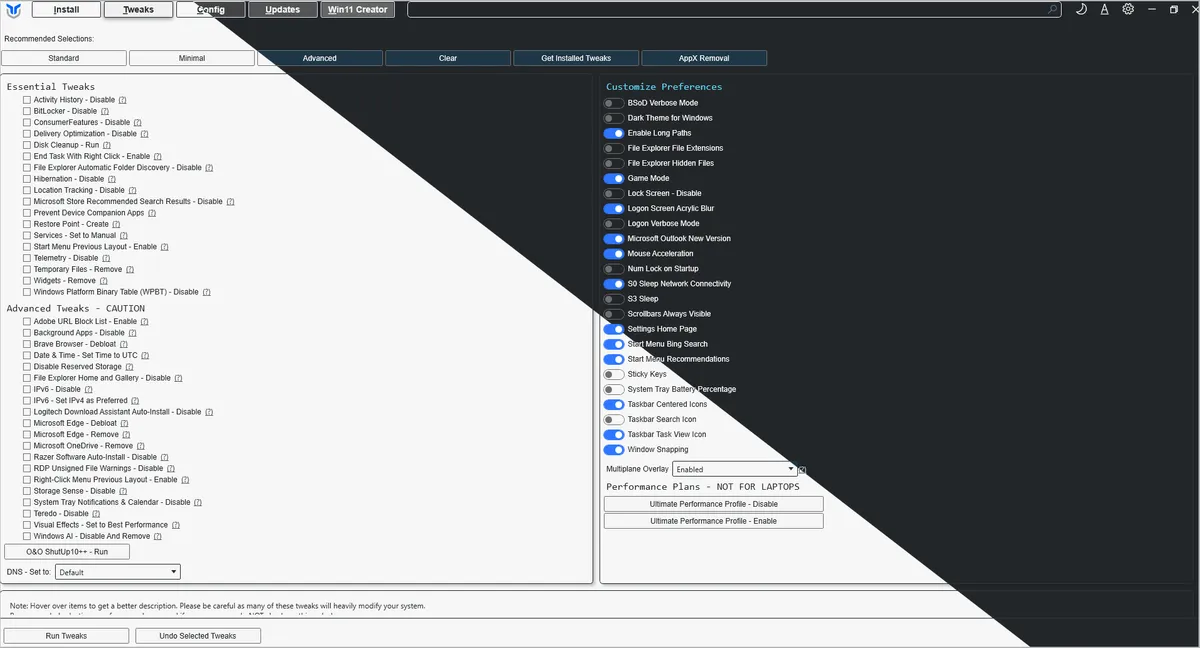



Windows setup is easy to start and tedious to finish
A fresh install works fine out of the box. Getting it configured the way you actually want takes an afternoon of registry edits, forum posts, and forgotten steps.
- Essential apps mean a dozen separate installers, each with its own bundled toolbar to decline.
- Privacy and telemetry settings are scattered across half a dozen different settings panels.
- The tweaks worth applying live in year-old forum threads, mixed in with outdated or risky advice.
- Undoing a tweak means remembering exactly what you changed and how.
- Doing it all again on the next machine means starting from zero.
What WinUtil does on a Windows 11 or Windows 10 PC
Instead of stitching together installers, registry edits and forum advice, you handle the whole Windows setup and optimization pass from one window. WinUtil targets Windows 11 today; Windows 10 reached end of support on October 14, 2025 and is no longer supported by the utility.
Install without the bloat
WinGet and Chocolatey install clean builds of your everyday apps, with no bundled toolbars or bundled offers.
Tweak with a checkbox
Essential and advanced tweaks for privacy, performance, and UI behavior are one click away, grouped by what they actually do.
Undo what you don’t like
Nearly every tweak can be reverted from the same panel, so trying something risky doesn’t mean a full reinstall.
Fix what’s broken
One-click repairs for networking, Windows Update, and WinGet handle the fixes people usually paste from a forum thread.
Manage updates your way
Switch between full updates, security-only updates, or fully paused — and back again — without digging through Group Policy.
Build your own ISO
Win11 Creator debloats and preconfigures an official Microsoft image, so new installs start from your baseline.
Why people use this Windows utility
Nothing phones home
WinUtil doesn’t collect or transmit anything. It’s a script that runs, makes the changes you selected, and exits.
Rollback planning
Many tweaks include undo actions, but recovery depends on the selected change and system state.
Grouped presets
Minimal, Standard, and Advanced presets give you a sane starting point instead of picking through every tweak individually.
WinGet & Chocolatey
Application installs go through package managers you can audit, not opaque bundled installers.
Automation-friendly
Drive WinUtil unattended with config files and parameters for repeatable rollouts across machines.
Custom Win11 ISOs
Debloat and preconfigure a Windows 11 image before it’s ever installed.
WinUtil setup: from a blank terminal to a configured PC
Open PowerShell as Administrator
Right-click the Start button and choose Terminal (Admin), or launch PowerShell and elevate manually.
Run the launch command
Downloads and starts the latest release.
irm "https://christitus.com/win" | iexInstall, tweak, fix, update
Work through the Install, Tweaks, Config, and Updates tabs — review and verify each change.
Who WinUtil is for
Home users, gamers, developers and IT staff who repeat the same Windows optimization steps on every machine. Registry edits and PowerShell one-liners work — WinUtil makes them repeatable and reversible.
- You keep full control — each selected tweak should be reviewed, documented, and backed by a recovery plan.
- You gain a single interface for installs, tweaks, fixes, and updates instead of five different tools.
- You avoid the bundled toolbars and bloat that come with most software installers.
Start with the WinUtil guides
Follow the step-by-step WinUtil guide for download, setup, application installs, tweaks, fixes and update settings.
Free and open source. No installer, no telemetry, no account required.